> For the complete documentation index, see [llms.txt](https://docs.blusapphire.io/llms.txt). Markdown versions of documentation pages are available by appending `.md` to page URLs; this page is available as [Markdown](https://docs.blusapphire.io/log-forwarding/03_log-forwarding-guide/log-forward/cisco/cisco-hx220c-m5sx-log-integration.md).
# Cisco HX220C-M5SX Log Integration
**Cisco HX220C-M5SX**\
**(Physical Server)**
**Log Integration Guide**
**Log Integration procedure:**
Cisco Hyperflex allows you to send Logs using Cisco Integrated Management Controller to a Syslog Server or Log Collector.
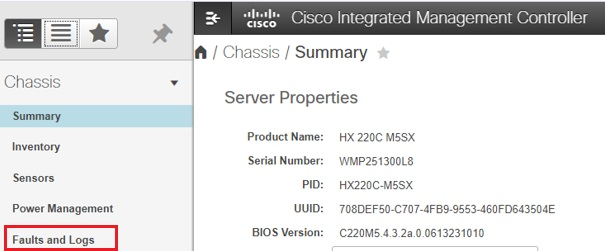
1. Login to the Cisco Integrated Management Controller Console and go to Chassis->Faults and Logs.
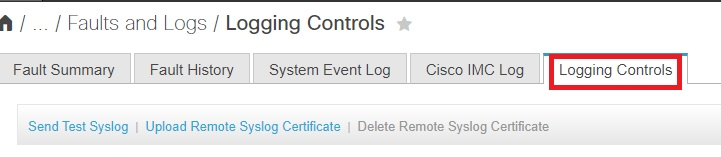
1. Under Faults and Logs, click on **Logging Controls**.
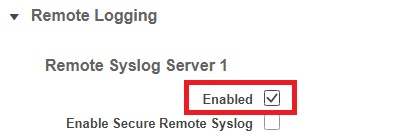
1. Under Logging Controls, **Enable Remote Syslog Server 1 or 2**.
If Remote Syslog Server 1 is already used, Enable Remote Syslog Server 2
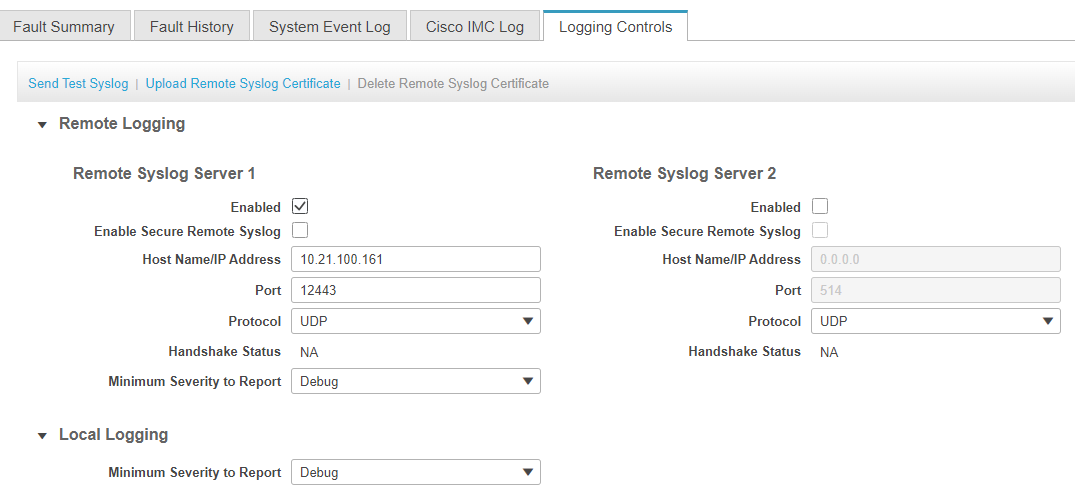
Fill in the details as below.
* Hostname/IP Address : \[Log Collector IP of specific branch]
* Port : 12443
* Protocol : UDP.
* Minimum Severity to Report : Debug
We have now configured Cisco Hyperflex to send logs to Log Collector.
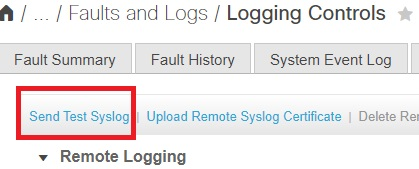
1. To Verify the configuration, Click on Send Test Syslog to generate Test Event.