> For the complete documentation index, see [llms.txt](https://docs.blusapphire.io/llms.txt). Markdown versions of documentation pages are available by appending `.md` to page URLs; this page is available as [Markdown](https://docs.blusapphire.io/log-forwarding/03_log-forwarding-guide/log-forward/hpe/hpe-proliant-dx380-gen10.md).
# HPE ProLiant DX380 Gen10
**HPE ProLiant DX380 Gen10 (Physical Server) Log Integration Guide**
**Log Integration procedure:**
HPE ProLiant DX380 Gen10 allows you to send Logs using HPE iLO Console to a Syslog Server or Log Collector.
1. Login to the HPE iLO Console and go to Management-> Remote Syslog
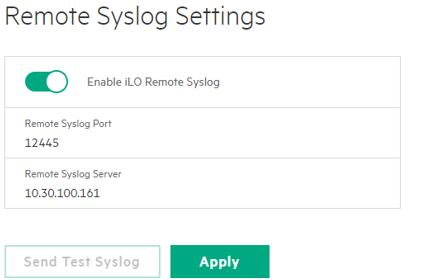
1. Under Remote Syslog, click on Enable **iLO Remote Syslog** option.
1. Configure Log Forwarding by entering details as below:
* Remote Syslog Port: 12445
* Remote Syslog Server: \[Log Collector IP of specific branch]
Click Apply.