> For the complete documentation index, see [llms.txt](https://docs.blusapphire.io/llms.txt). Markdown versions of documentation pages are available by appending `.md` to page URLs; this page is available as [Markdown](https://docs.blusapphire.io/log-forwarding/mirror-span-port-configuration/netflow-configuration-sophos-xg.md).
# Netflow Configuration Sophos XG
This guide outlines procedure to forward NetFlow records from Sophos XG Firewall to Log Collector.
* NetFlow is a network protocol that enables you to monitor bandwidth usage and traffic flow.
* If you add a NetFlow server to Sophos Firewall, it sends the NetFlow records of source, destination, and traffic volume to the NetFlow server.
* The records help you identify the protocols, policies, interfaces, and users consuming high bandwidth.
* You can use data analysis tools, such as Open Source Data Analyzer and PRTG to generate reports from the NetFlow records.
* Sophos XG firewalls support NetFlow v5. You can export all the parameters of v5.
### **Configure NetFlow**
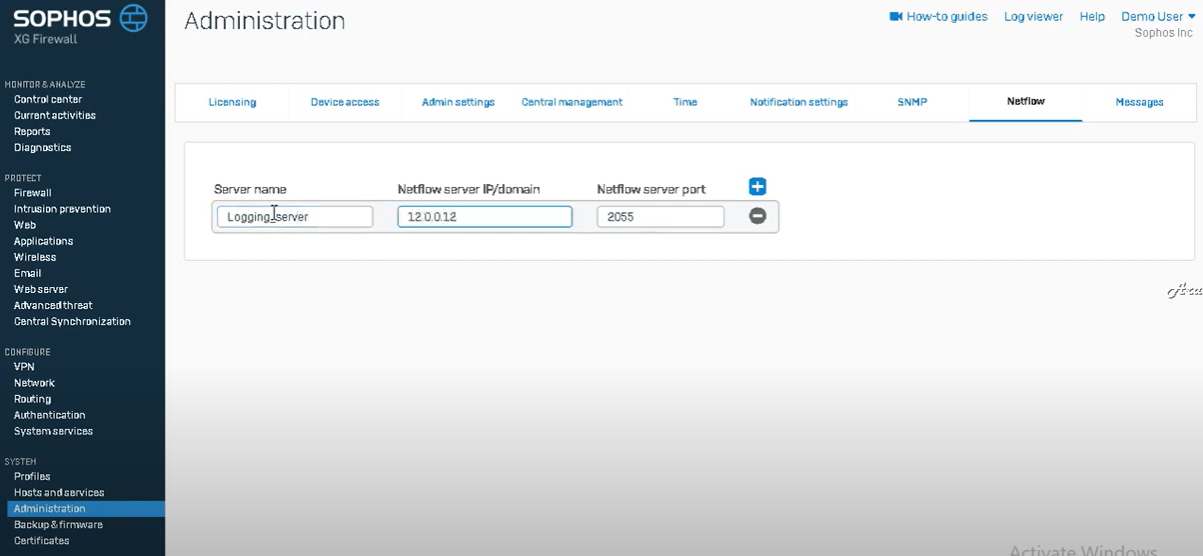
1. Log into the firewall’s web admin console.
2. Navigate to System > Administration.
3. Select NetFlow from the top navigation panel.
4. Click on the + sign to create a new row.
5. In the Server Name field, enter a recognizable name for the Log collector.
6. In the NetFlow Server IP/Domain field, enter the Log collector IP address.
7. In the NetFlow Server Port field, enter the port number provided.
 **Note** :
* Sophos XG devices will only collect NetFlow from firewall rules that are logged.
* So if it’s not already enabled, you’ll need to ensure the Log Firewall Traffic option is enabled for all rules that are passing traffic.
\*\* Below procedure is applicable only if Traffic logging is not enabled.
### Enable Traffic Logging
1. **Enable firewall traffic logs**:
* Go to **Firewall > Edit Firewall Rule** to view the status of logging and security policies.
* Enable logging of firewall traffic from Log Traffic section. It ensures that traffic passing through the Firewall rule has been logged and can be viewed from Log Viewer.
* We recommend you enable logging for all firewall rules.

**Reference:**
**Note** :
* Sophos XG devices will only collect NetFlow from firewall rules that are logged.
* So if it’s not already enabled, you’ll need to ensure the Log Firewall Traffic option is enabled for all rules that are passing traffic.
\*\* Below procedure is applicable only if Traffic logging is not enabled.
### Enable Traffic Logging
1. **Enable firewall traffic logs**:
* Go to **Firewall > Edit Firewall Rule** to view the status of logging and security policies.
* Enable logging of firewall traffic from Log Traffic section. It ensures that traffic passing through the Firewall rule has been logged and can be viewed from Log Viewer.
* We recommend you enable logging for all firewall rules.

**Reference:**