# Dell PowerEdge Log Integration

**Dell**

**PowerEdge R440/R740**\
\&#xNAN;**(Physical Server)**

**Log Integration Guide**

**Log Integration procedure:**

Dell PowerEdge allows you to send Alerts using iDRAC to a Syslog Server or Log Collector.

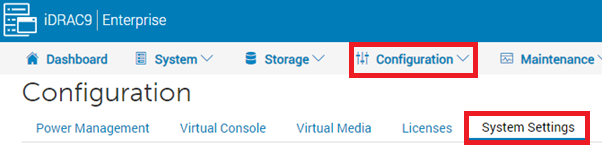
1. Login to the iDRAC interface and go to Configuration > System Settings.

<figure><img src="https://2078222076-files.gitbook.io/~/files/v0/b/gitbook-x-prod.appspot.com/o/spaces%2F-MMRHZBPHlLDUc8519fX%2Fuploads%2FyQMNJOAkRNTMAdCuUXMi%2Fimage.png?alt=media&#x26;token=b895fcc1-8c44-4df3-aab1-10e795361a97" alt=""><figcaption></figcaption></figure>

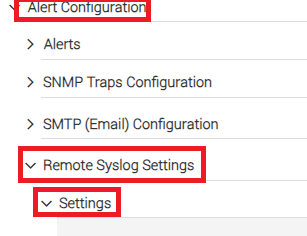
1. Under System Settings, Click on Alert Configuration->Remote Syslog Settings->Settings.

<figure><img src="https://2078222076-files.gitbook.io/~/files/v0/b/gitbook-x-prod.appspot.com/o/spaces%2F-MMRHZBPHlLDUc8519fX%2Fuploads%2FjPMQI32n8VEj7VTmlaE1%2Fimage.png?alt=media&#x26;token=0a837486-76c2-4811-beff-5ea286a90bc8" alt=""><figcaption></figcaption></figure>

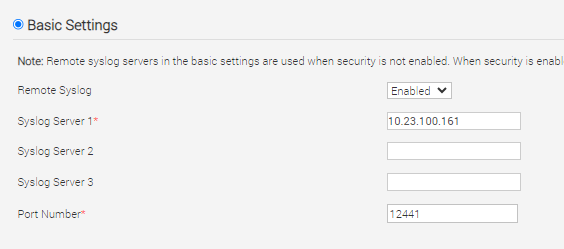
1. Under Settings-> Basic Settings, Enter details as below:

* Remote Syslog: Enabled
* Syslog Server 1 : \[Log Collector IP of specific branch]
* Port: 12441

<figure><img src="https://2078222076-files.gitbook.io/~/files/v0/b/gitbook-x-prod.appspot.com/o/spaces%2F-MMRHZBPHlLDUc8519fX%2Fuploads%2F3qxf4MIGOEUTjpZimn0Q%2Fimage.png?alt=media&#x26;token=af8ec8d5-e0e6-475a-b296-b7c09c1aaa0e" alt=""><figcaption></figcaption></figure>

Note: If Syslog Server 1 is already used, Enter details in Syslog Server 2 or Syslog Server 3.

Click **Apply** to save the changes.

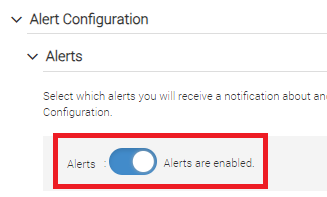
1. Goto Alert Configuration-> Alerts, Enable the ‘Alerts’ if not enabled.

<figure><img src="https://2078222076-files.gitbook.io/~/files/v0/b/gitbook-x-prod.appspot.com/o/spaces%2F-MMRHZBPHlLDUc8519fX%2Fuploads%2F5dknelmfhtHFuGoZXR5a%2Fimage.png?alt=media&#x26;token=8290e669-8dc4-4b26-9c7e-5b3f8f1c212e" alt=""><figcaption></figcaption></figure>

1. Under same Alerts Section, Tick the ‘**Remote System log**’ option as below and click **Apply**.

<figure><img src="https://2078222076-files.gitbook.io/~/files/v0/b/gitbook-x-prod.appspot.com/o/spaces%2F-MMRHZBPHlLDUc8519fX%2Fuploads%2FNnBdQcRZsGvgAQYlGcNo%2Fimage.png?alt=media&#x26;token=2cc26e32-19cb-4002-b9f2-cef817288532" alt=""><figcaption></figcaption></figure>

1. You have finished the iDRAC Remote Syslog configuration successfully.