# HPE ProLiant DX380 Gen10 Log Integration

**HPE ProLiant DX380 Gen10**\
\&#xNAN;**(Physical Server)**

**Log Integration Guide**

**Log Integration procedure:**

HPE ProLiant DX380 Gen10 allows you to send Logs using HPE iLO Console to a Syslog Server or Log Collector.

1. Login to the HPE iLO Console and go to Management-> Remote Syslog

<figure><img src="https://2078222076-files.gitbook.io/~/files/v0/b/gitbook-x-prod.appspot.com/o/spaces%2F-MMRHZBPHlLDUc8519fX%2Fuploads%2FMHB4dFLg84u8qFZQePga%2Fimage.png?alt=media&#x26;token=72cd73c5-d901-4375-82aa-f9a1838d5db2" alt=""><figcaption></figcaption></figure>

1. Under Remote Syslog, click on Enable **iLO Remote Syslog** option.

<figure><img src="https://2078222076-files.gitbook.io/~/files/v0/b/gitbook-x-prod.appspot.com/o/spaces%2F-MMRHZBPHlLDUc8519fX%2Fuploads%2FMTHeyPVzhc4WDPkzQhSs%2Fimage.png?alt=media&#x26;token=f30f7b2a-af15-4db9-a902-60ad6fd1bbe7" alt=""><figcaption></figcaption></figure>

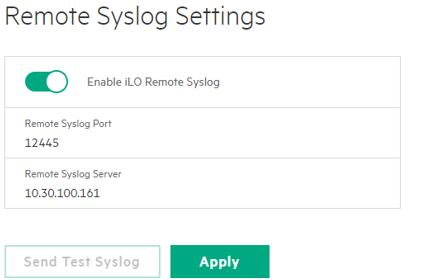
1. Configure Log Forwarding by entering details as below:

* Remote Syslog Port: 12445
* Remote Syslog Server: \[Log Collector IP of specific branch]

<figure><img src="https://2078222076-files.gitbook.io/~/files/v0/b/gitbook-x-prod.appspot.com/o/spaces%2F-MMRHZBPHlLDUc8519fX%2Fuploads%2FjX3iBQTfJboIGKtE41ue%2Fimage.png?alt=media&#x26;token=bcc38c2f-9ffb-4e7b-a79d-df745272f828" alt=""><figcaption></figcaption></figure>

Click Apply.