# IBM Storwize Log Integration

**Log Integration Guide**

**Log Integration procedure:**

To forward logs, make the following configuration.

1. Login to the Management Console.
2. Navigate to **Settings->Notifications->Syslog.**

<figure><img src="https://2078222076-files.gitbook.io/~/files/v0/b/gitbook-x-prod.appspot.com/o/spaces%2F-MMRHZBPHlLDUc8519fX%2Fuploads%2FFBBuvVtthX2mrdbynKdT%2Fimage.png?alt=media&#x26;token=55aea077-4fb7-4743-a818-5e66fd8195e6" alt=""><figcaption></figcaption></figure>

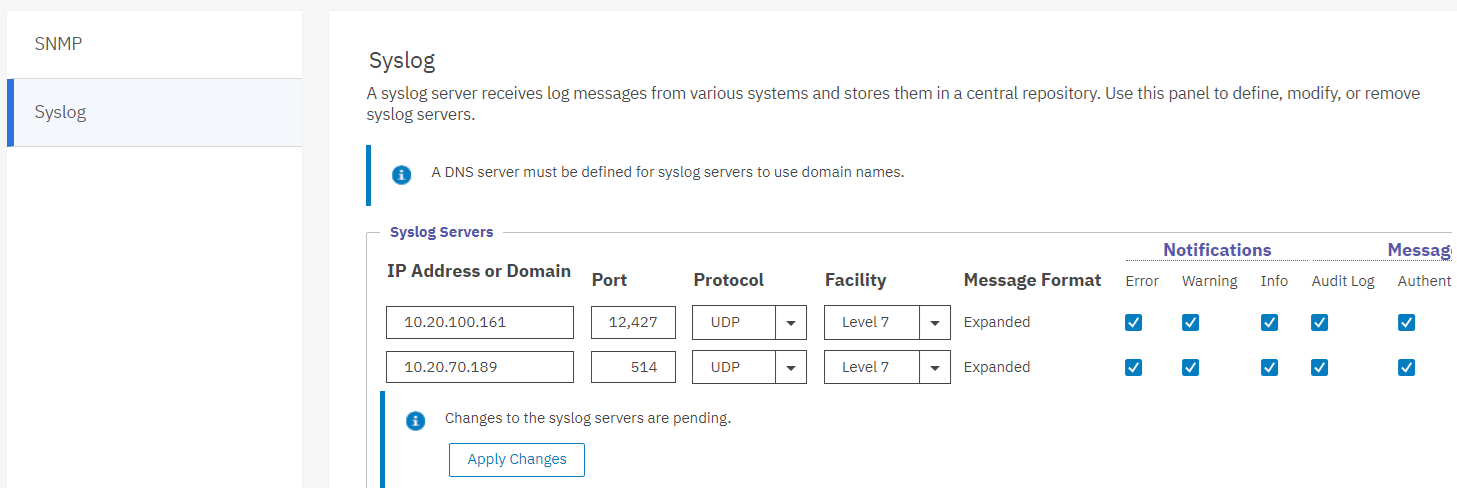
3. Under Syslog Servers, input the following details:

* IP Address or Domain: \[Log Collector IP of specific branch]
* Port: 12427
* Protocol: UDP
* Facility: Level 7
* Tick all the options under Notifications and Messages

<figure><img src="https://2078222076-files.gitbook.io/~/files/v0/b/gitbook-x-prod.appspot.com/o/spaces%2F-MMRHZBPHlLDUc8519fX%2Fuploads%2FsFWmnemO3sbeMLphRxMj%2Fimage.png?alt=media&#x26;token=c9bdae3a-cda5-4ec1-ae26-8ffb6b86e90a" alt=""><figcaption></figcaption></figure>

4. Click ‘**Apply Changes’**