# Lenovo ThinkSystem SR650 Log Integration

**Lenovo**

**ThinkSystem SR650**\
\&#xNAN;**(Physical Server)**

**Log Integration Guide**

**Log Integration procedure:**

Lenovo ThinkSystem SR650 allows you to send Alerts using XClarity Controller to a Syslog Server or Log Collector.

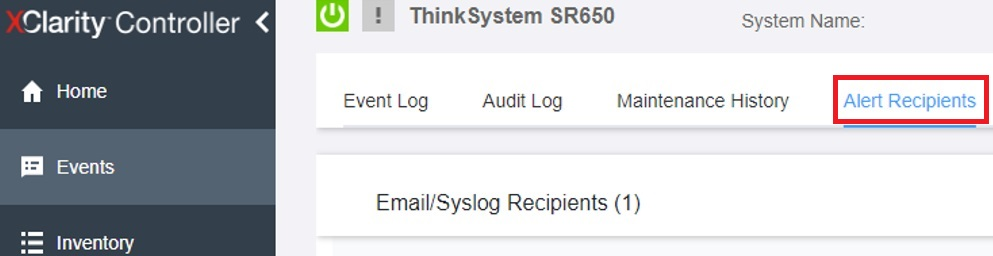
1. Login to the XClarity Controller Console and go to Events->Alert Recipients.

<figure><img src="https://2078222076-files.gitbook.io/~/files/v0/b/gitbook-x-prod.appspot.com/o/spaces%2F-MMRHZBPHlLDUc8519fX%2Fuploads%2FRReEckvp3piKaITV4a2i%2Fimage.png?alt=media&#x26;token=db29c9b9-d505-4a1b-97cc-8e2bae17b6ed" alt=""><figcaption></figcaption></figure>

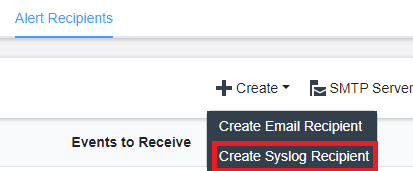
1. Under Alert Recipients, Click on Create->Create Syslog Recipient.

<figure><img src="https://2078222076-files.gitbook.io/~/files/v0/b/gitbook-x-prod.appspot.com/o/spaces%2F-MMRHZBPHlLDUc8519fX%2Fuploads%2F2hDl4Io20iYEHTWfWPPV%2Fimage.png?alt=media&#x26;token=37eb01e9-1702-4493-8073-e1cdfe83902e" alt=""><figcaption></figcaption></figure>

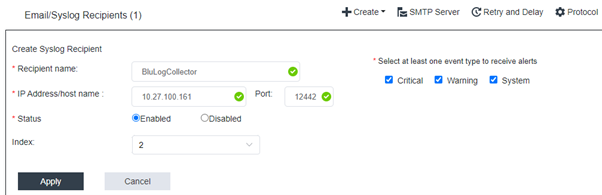
1. Configure Log Forwarding with the details as below:

* Recipient Name: BluLogCollector
* IP Address: \[Log Collector IP of specific branch]
* Port: 12442
* Status : Enabled
* Index: Leave as default.
* Event Type: Check Critical, Warning, System.

<figure><img src="https://2078222076-files.gitbook.io/~/files/v0/b/gitbook-x-prod.appspot.com/o/spaces%2F-MMRHZBPHlLDUc8519fX%2Fuploads%2FxdxAugqMChMbrb3AS1SK%2Fimage.png?alt=media&#x26;token=16783f89-7c3d-4e88-978f-8d8410c240e1" alt=""><figcaption></figcaption></figure>

Click **Apply**.

1. Configured Server details will be displayed as below:

<figure><img src="https://2078222076-files.gitbook.io/~/files/v0/b/gitbook-x-prod.appspot.com/o/spaces%2F-MMRHZBPHlLDUc8519fX%2Fuploads%2FZ5u2bpToyQ94dQyswNLL%2Fimage.png?alt=media&#x26;token=a9780dfd-3256-455d-9195-95ea4f938bf2" alt=""><figcaption></figcaption></figure>

1. To test Syslog Configuration, click on Test icon as highlighted below:
<figure><img src="https://2078222076-files.gitbook.io/~/files/v0/b/gitbook-x-prod.appspot.com/o/spaces%2F-MMRHZBPHlLDUc8519fX%2Fuploads%2FvlOTgcQCEburuODDjgxT%2Fimage.png?alt=media&#x26;token=0d2f5f08-b2c8-43e5-ac98-f57f5f007d6b" alt=""><figcaption></figcaption></figure>